Alerts
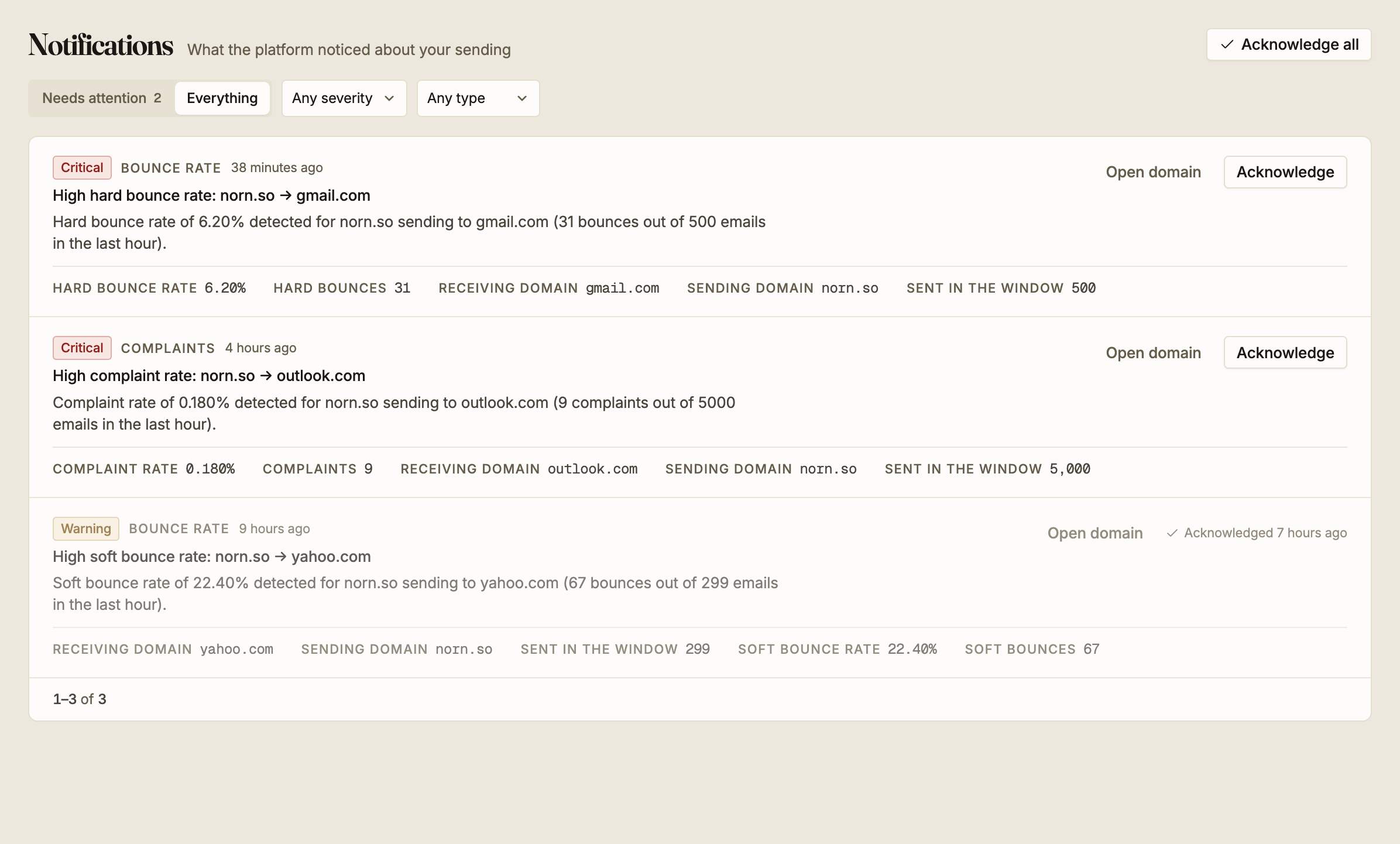
Notifications is what the platform noticed about your sending. Epostix watches each of your sending domains against each receiving provider and raises an alert when bounces or complaints climb far enough to threaten your reputation.
What raises an alert
Alerts are measured per pair: one of your sending domains against one receiving provider.
That is why a title reads norn.so → gmail.com rather than naming your domain alone. A
problem with one provider is a different problem from a problem everywhere, and the pair is
what tells you which one you have.
Epostix looks at a rolling one hour window and checks it every five minutes.
| Measure | Raises | At |
|---|---|---|
| Hard bounce rate | Critical | 5% of the window |
| Complaint rate | Critical | 0.1% of the window |
| Soft bounce rate | Warning | 20% of the window |
The rates differ by that much because the failures differ. A hard bounce is a permanent rejection and is the thing providers judge you on, so the bar is low. A soft bounce is usually temporary, so it takes a fifth of your mail failing before it is worth telling you. Complaints have the lowest bar of all: one in a thousand recipients marking a message as spam is already enough to hurt. See bounce rate and suppression for what these cost you.
A pair needs at least 50 messages in the window before it can alert. Below that, a handful of bounces would produce a frightening percentage that means nothing. Low-volume sending will not trigger these alerts, which is correct, but it also means an alert is not the only way a problem shows up. The Overview is.
How often you hear about it
The monitor runs every five minutes, but you are not told every five minutes.
On this screen, one alert per pair per type per hour. A domain that keeps breaching the threshold produces one entry, not twelve.
By email, one per type per hour for the whole workspace, sent to everyone in it. This is broader than the screen on purpose. If three of your domains breach at once you will see three alerts here and receive one email, because the email exists to make you open the screen, not to reproduce it.
Working through them
Needs attention is the default view and shows what you have not acknowledged yet. The count next to it is repeated in the sidebar, so an unread alert is visible from any screen. Everything adds the alerts you have already dealt with.
Both dropdowns narrow the list further: Any severity to Critical, Warning or Info, and Any type to Bounce rate, Complaints or Delivery.
Each alert carries the numbers behind it: the rate, the count that produced it, both domains, and how many messages were sent in the window. The rate is the reason for the alert and the counts are how seriously to take it. A 6.20% hard bounce rate over 500 messages is a real signal; the same rate over 60 is mostly noise.
Open domain goes to the sending domain named in the alert, which is where anything about it gets fixed.
Acknowledging
Acknowledge marks an alert as dealt with and moves it out of Needs attention. Acknowledge all does the same for everything currently unacknowledged.
Acknowledging is a record that you looked, not a fix. It changes nothing about your sending and it does not stop the alert returning. If the underlying rate is still above the threshold an hour later, a new alert is raised for the same pair.
An acknowledged alert keeps its full detail and shows when it was acknowledged, so the history of what went wrong stays readable after the fact.