Reading the activity log
Activity is the record of every individual message the workspace has sent. Overview tells you whether sending is healthy; Activity is where you go when you need to find one message and explain what happened to it.
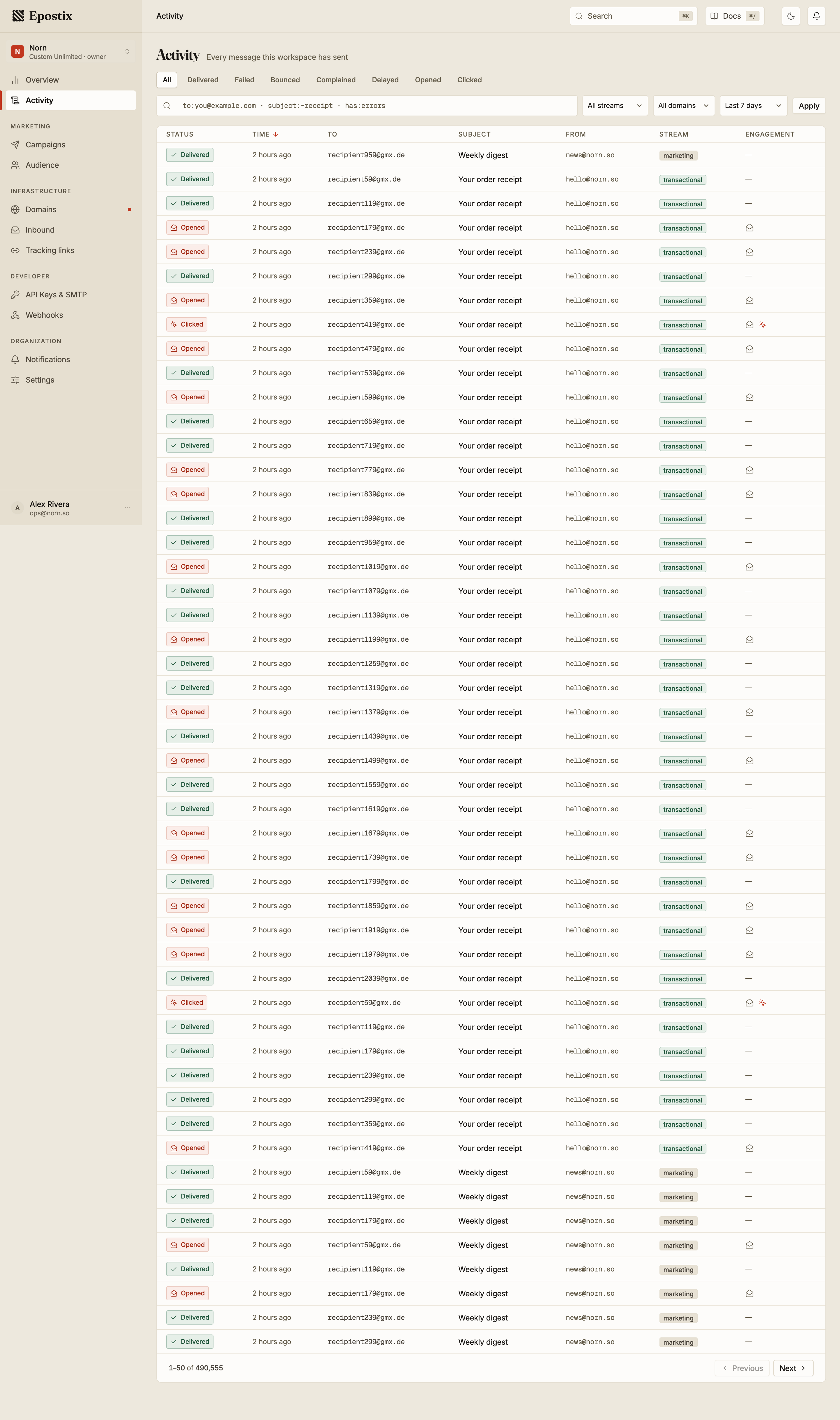
Statuses
A message carries one status: the furthest thing that happened to it. A message that was delivered and then opened reads Opened, not Delivered. A message that bounced reads Bounced even though it was accepted for sending first.
| Status | Meaning |
|---|---|
| Queued | Waiting to be handed to the relay |
| Accepted | Taken by the relay, no delivery confirmation yet |
| Delayed — retrying | The receiving server asked us to try later; retries are running |
| Delivered | The receiving server accepted the message |
| Opened | Delivered, and the message was opened |
| Clicked | Delivered, opened, and a link was clicked |
| Bounced | The receiving server rejected the message |
| Complained | The recipient marked the message as spam |
| Failed | The send could not be completed |
Bounced and Failed are different. A bounce is a rejection by the receiving server. A failure stopped earlier than that. Both appear as separate filters because they need different responses. See bounce rate and suppression.
Complained is the most serious of these. One complaint is noise; a pattern of them costs you inbox placement faster than bounces do.
Narrowing the list

The chips across the top filter by status. Below them, three selects narrow by stream (transactional or marketing), by sending domain, and by time. The default range is the last 7 days; All time and a custom range are both available.
Every filter lives in the page address, so a narrowed view can be bookmarked or pasted to a colleague and they will see exactly what you see.
Search syntax
The search box takes plain text and structured terms in the same query. Plain words match across the message; structured terms are precise.
| Term | Matches |
|---|---|
to:[email protected] | That exact recipient |
to:~example.com | Any recipient containing that text |
from:[email protected] | That exact sender |
from:~norn | Any sender containing that text |
subject:receipt | Subject containing that text |
campaign:<id> | One campaign, by its ID |
has:errors | Only messages that recorded an error |
The ~ prefix means contains. Without it, to: and from: expect a complete address.
Typing to:example.com is rejected with a message telling you to use to:~example.com,
because a partial address matching nothing looks identical to a query with no results.
Wrap a value in quotes when it contains spaces: subject:"order confirmation".
Terms combine, and anything that is not a recognised term is treated as free text:
to:~gmail.com subject:receipt has:errors
Unrecognised terms are reported rather than silently ignored, so a typo like sender:x
tells you it is not a filter instead of quietly returning everything.
Opening a message
Selecting a row opens the message: its addresses, its sending domain, how long delivery took, its size, the content that was sent, and its full event history.
That history is the useful part when something went wrong. It is covered in delivery events.