DNS records explained
Adding a domain generates five records. Two of them decide whether the domain verifies; the other three improve delivery and reporting. This page explains what each one is for.
If you are setting a domain up right now, verify a sending domain is the walkthrough. This page is the reference behind it.
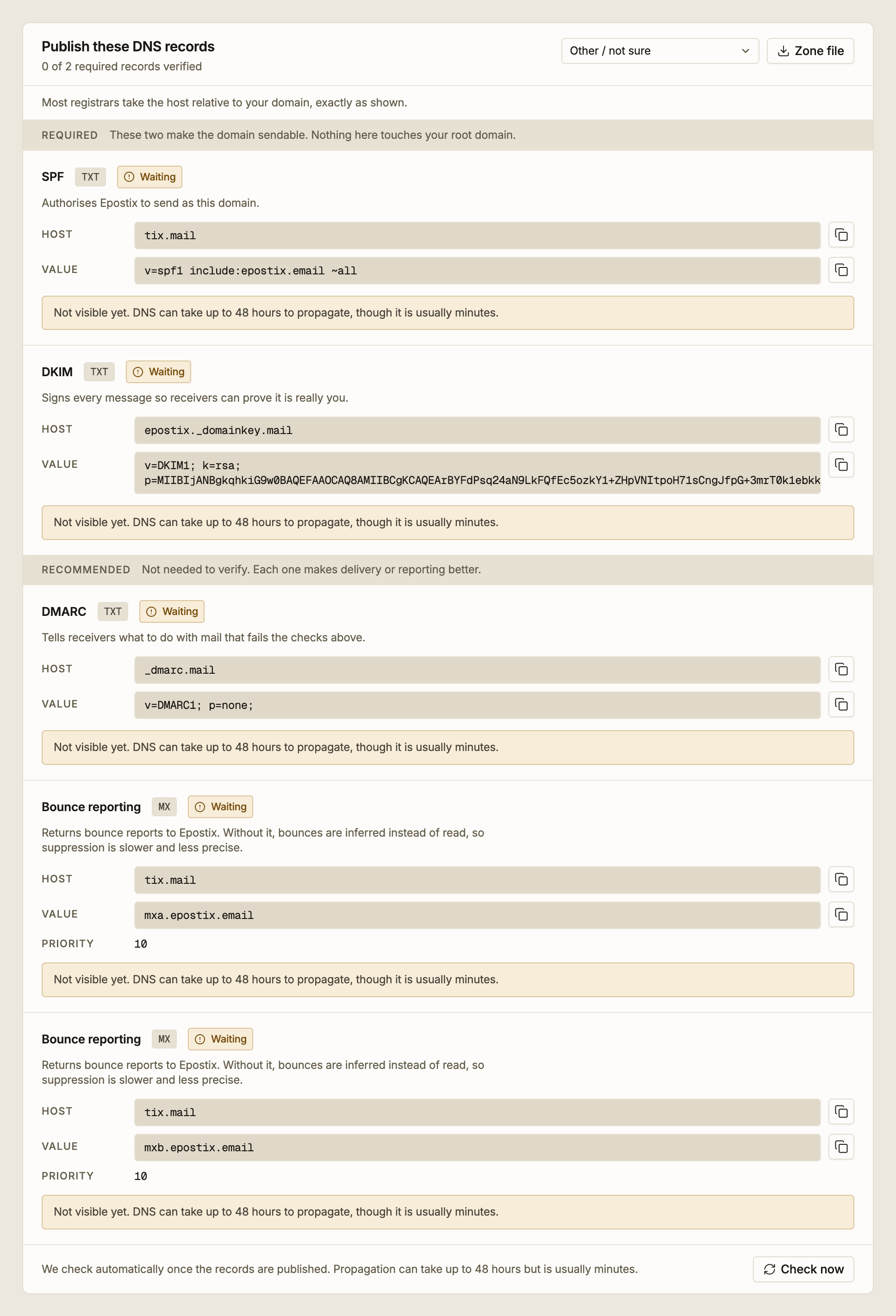
Where the records go
Every host Epostix shows you is relative to your root domain, and it already includes whatever subdomain you added.
Add mail.norn.so and the SPF host reads tix.mail. You create that record in the
norn.so zone. The resulting record is tix.mail.norn.so.
This trips almost everyone up once, because most registrars append your domain to whatever
you type. Enter the full tix.mail.norn.so and you get tix.mail.norn.so.norn.so, which
resolves to nothing. Enter exactly what Epostix shows.
Sending lives under a tix label rather than at your root. The practical effect is that
Epostix's SPF and MX records sit apart from any mail records your root domain already has,
so adding Epostix does not disturb the mail you already send.
SPF (required)
A TXT record that lists who is allowed to send as your domain. Without it, receiving servers have no way to distinguish your mail from anyone spoofing you, and most large providers will reject or spam-folder the message.
The value ends in ~all, a soft fail: it tells receivers that anything not on the list
is suspicious but should not be discarded outright. That is the right setting for a domain
in normal operation.
A hostname can have only one SPF record. If the host Epostix gives you already has an SPF
record from another provider, do not add a second. Merge the include: into the existing
one. Two SPF records on one host is an error condition, and receivers treat it as a failure
rather than picking one.
DKIM (required)
A TXT record holding a public key. Epostix signs every message with the matching private key, and receivers use the public key to prove the message really came from you and was not altered in transit.
The record name contains the selector, the label before ._domainkey. That is how
receivers know which key to fetch. The key is RSA and the value is long. Copy it with the
copy button rather than retyping it; one wrong character and the signature fails.
Once the domain is verified, the domain's DKIM key panel shows the selector, the key type and when it was created.
DMARC (recommended)
A TXT record at _dmarc that tells receivers what to do when a message fails the SPF and
DKIM checks above. Without SPF and DKIM in place it does nothing, which is why it is not
required to verify.
The value Epostix generates uses p=none, which means report, but do not act. That is the
correct place to start: it makes you visible to receivers as a domain that has thought about
authentication, without risking legitimate mail being rejected while you are still finding
out which of your systems send as your domain.
Tightening from p=none to p=quarantine or p=reject is a decision to make later, once
you are confident every source of mail for the domain is authenticated.
Bounce reporting (recommended)
Two MX records that let receiving servers deliver bounce reports back to Epostix.
Without them, bounces are inferred from the SMTP conversation rather than read from the report the receiving server sends. Inference works, but it is slower and less precise, which means addresses take longer to be suppressed and some soft bounces are misread. Both records point at different hosts for redundancy; publish both, with the same priority.
These sit on the same tix host as SPF, so they do not affect where mail to your root
domain is delivered. Your existing MX records are untouched.
Host and value formats by registrar
The record is the same everywhere; what differs is what your provider calls the fields and what it does to your input. Select your provider at the top of the records panel and Epostix reformats the values to match.
| Provider | What to know |
|---|---|
| Cloudflare | Set proxy status to DNS only. A proxied record does not resolve to what receivers need to see |
| Namecheap | Use Advanced DNS. The domain is appended to the host for you |
| GoDaddy | The domain is appended to the name for you. Leave TTL at its default |
| Google Domains / Squarespace | Enter the host relative to your domain. Squarespace splits long TXT values across lines, so paste as one line |
| AWS Route 53 | Wants the fully qualified record name, and TXT values wrapped in quotes |
| Anything else | Host relative to your domain, exactly as shown |
Two formatting rules cause most failures:
- Quotes. Most registrars add the quotes around a TXT value themselves. Paste the value without them. Route 53 is the exception and wants them.
- Trailing dots. A trailing dot makes a name absolute. Some providers add it, some reject it. The two forms are not interchangeable.
Zone file downloads all five records in BIND format if you would rather edit a zone than fill in forms.
Changing these later
Verification is not a one-time gate. If a required record is later changed or removed, the domain's DNS health panel reports it and sending from that domain is at risk until it is fixed.