FastTrack
FastTrack decides which player gets which email and when. Epostix sends it. Once connected, FastTrack hands each email to Epostix, and Epostix reports back what happened to it: delivered, opened, clicked, bounced or marked as spam.
Set it up under Integrations, then FastTrack.
Staging and production
FastTrack runs a staging environment and a production environment, and Epostix connects to each one separately. Each has its own key, brands and settings. A staging key is refused by the production connection and the other way round, so a test campaign cannot reach real players by mistake.
Pick the environment from the tabs at the top of the page.
Connecting
Connect issues a key for that environment and shows it once. Copy it straight away: Epostix keeps only a fingerprint and cannot show it again.
Give FastTrack two things:
- the base URL shown on the connection, and
- the key, sent with every request in the
X-Api-Keyheader.
Brands and senders
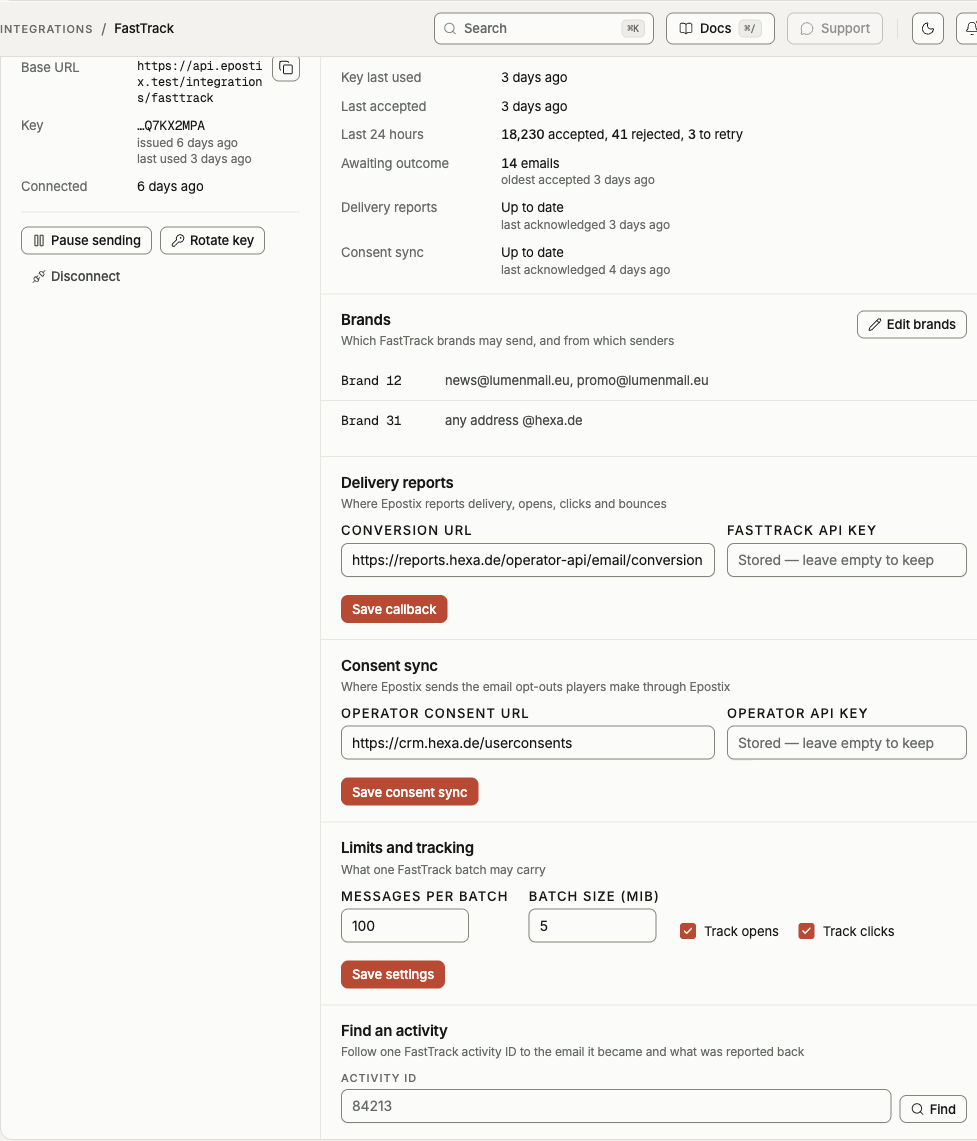
A brand is a FastTrack brand ID. Each brand lists the senders it may use. A sender is either a whole domain, which allows any address on it, or one address on that domain. Only domains of this workspace that can send are offered.
FastTrack's emails are checked against this list. An email from a brand that is not listed, or from an address the brand may not use, is rejected rather than sent. Until at least one brand has a sender, every email is rejected.
What Epostix answers
Every email in a batch gets one of three answers.
| Answer | Meaning | What FastTrack should do |
|---|---|---|
| Successful | Epostix accepted the email and will send it. | Nothing. Delivery is reported later. |
| Failed | Epostix will never send this email as it is. | Fix the email or the setup. Retrying changes nothing. |
| Fatal | Epostix could not take the email right now. | Retry later. |
Sending the same activity ID again returns the first answer and the same email ID, and nothing is sent twice. Sending different content under an activity ID that was already accepted is rejected.
These are the reasons a failed or fatal answer carries:
| Reason | Answer | Cause |
|---|---|---|
unknown_brand | Failed | The brand is not listed on the connection. |
sender_not_allowed | Failed | The brand may not send from this address. |
suppressed | Failed | The player unsubscribed or complained earlier. |
invalid_address | Failed | The recipient address is not valid. |
amp_not_supported | Failed | The email has AMP content. See below. |
content_conflict | Failed | A different email was already accepted for this activity ID. |
sender_domain_pending | Fatal | The sending domain is not ready yet. |
connection_paused | Fatal | Sending is paused on the connection. |
temporary | Fatal | Something on the Epostix side failed. |
Epostix sends HTML only. An email that carries AMP content is rejected with
amp_not_supported instead of being sent without it, so you find out in FastTrack rather
than from players. Send the email again without the AMP part.
Delivery reports
Enter the conversion URL FastTrack gave you and the FastTrack API key reports are
sent with. The URL has to be a public https address without credentials in it. Epostix
does not follow redirects when it reports, so give the final URL.
Epostix reports:
| Report | When |
|---|---|
| Delivered | The player's mail server accepted the email. |
| Opened | The player opened it. Automatic opens by privacy proxies and security scanners are not reported. |
| Clicked | The player clicked a link. Automatic clicks by security scanners are not reported. |
| Spam | The player marked it as spam. |
| Bounce | The player's mail server refused it, including a refusal after delivery. |
| Dropped | Epostix did not try, because the player is suppressed. |
| Failed | The email could not be sent for another reason, with that reason attached. |
Each report has its own event ID, and a report that is sent again keeps it, so FastTrack can ignore repeats. When the conversion URL does not answer, Epostix retries with growing pauses for up to 7 days.
Opens and clicks are only measured while Track opens and Track clicks are on.
Consent sync
When a player unsubscribes from a FastTrack email through Epostix, or marks it as spam, Epostix stops sending to them at once. If you enter an operator consent URL and its operator API key, Epostix also tells the operator, so the player's consent is withdrawn there too.
It works the other way as well. When FastTrack tells Epostix that a player withdrew email consent, Epostix stops sending to every address of that player and cancels their emails that are still waiting to go out. Epostix only acts on withdrawals: a player who opts in again is not resubscribed automatically.
Limits
Messages per batch is how many emails one request may carry, up to 100. Batch size is how large one request may be, up to 10 MiB. A batch over either limit is refused as a whole.
Health
The Health panel shows whether the connection is doing its job:
- when FastTrack last used a key, and when Epostix last accepted an email,
- how many emails were accepted, rejected or answered with a retry in the last 24 hours,
- how many accepted emails are still waiting for their outcome,
- how many reports and consent changes are waiting to reach FastTrack and the operator, and why the last attempt failed if it did.
The badge next to Connection sums it up. Delivery failing means the last report or consent change was refused and nothing has been accepted since. Reports waiting means reports or consent changes have been queued for more than a few minutes.
To follow a single email, enter its FastTrack activity ID under Find an activity. It shows how Epostix answered, the email it became, and every report sent back for it.
Pausing
Pause sending stops Epostix from accepting new emails. FastTrack gets a retry answer for each one, so nothing is lost: it sends them again after you resume. Emails accepted before the pause still go out, and reports and consent changes keep flowing.
Rotating the key
Rotate key issues a new key and shows it once. The old key keeps working for 24 hours, so FastTrack can switch without dropping a batch. Each key shows when it was last used, which tells you when FastTrack has moved to the new one.
Disconnecting
Disconnect stops every key at once, so FastTrack can no longer send. Reports for emails that were already accepted still go out. Brands and settings are kept, and Reconnect issues a new key.