Building an audience
Your audience is everyone you can send marketing email to. It is one list per workspace, shared by every campaign, so a contact who unsubscribes is out of all of them at once.
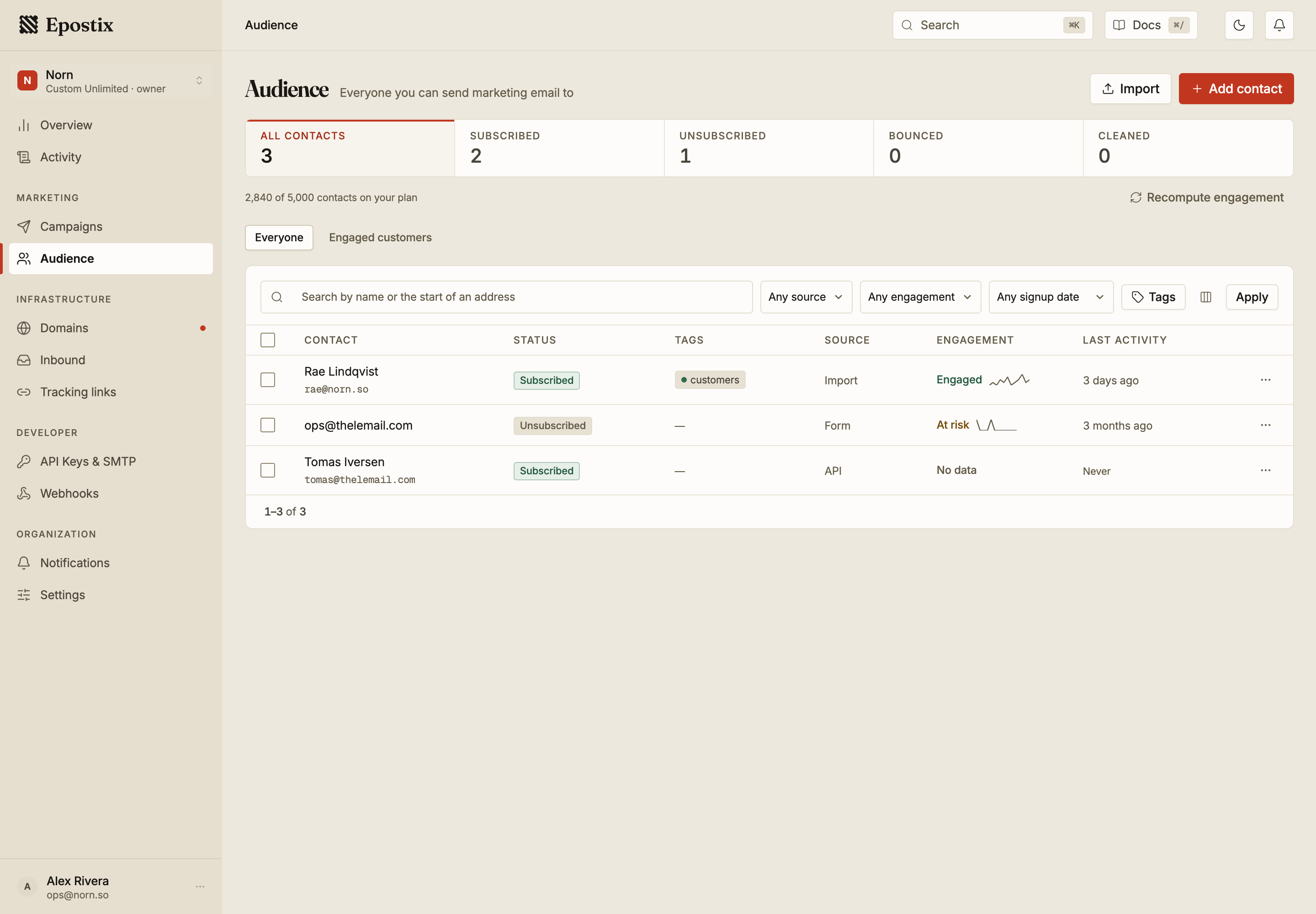
Contacts arrive from an import, from the API, from SMTP, or from a signup form. The Source column records which. Re-importing an address can update its source, so treat the column as where the contact most recently came from.
Statuses
A contact has exactly one status, and only one of them can receive campaigns.
| Status | Meaning |
|---|---|
| Subscribed | Can receive marketing campaigns |
| Unsubscribed | Opted out. Campaigns skip them, and an import never puts them back |
| Bounced | Their mail server rejected us. Sending again risks your reputation |
| Cleaned | Removed from sending by a cleanup run |
Unsubscribed is permanent from the outside. Re-importing a file that contains an unsubscribed address does not resubscribe them. This is deliberate, and it is the behaviour you want: an import is the most common way a list accidentally re-mails people who asked to be left alone.
Cleaned means the platform took the address out of sending for you. The reason is recorded on the contact, and it is one of: the address is malformed, the domain has no mail server, the address was already on your suppression list, or it was imported while suppressed. Nothing is deleted. The contact stays in the list and simply stops receiving campaigns.
The counters across the top of the screen are the whole list, not the filtered view. The line underneath tells you how many rows match the filters you have set.
Engagement
Engagement is calculated from how a contact behaved across recent campaigns, not from a single send.
| Tier | What it means |
|---|---|
| No data | Has not been sent a campaign yet |
| New | Fewer than three campaigns received, so it is too early to judge |
| Engaged | Opened or clicked within the last three campaigns |
| At risk | Three or four campaigns since they last engaged |
| Inactive | Five or more campaigns since they last engaged |
| Cold | Five or more campaigns received, never once engaged |
Cold and Inactive are different problems. Inactive contacts engaged once and stopped, so they are worth a re-engagement attempt. Cold contacts have never engaged at all, which usually means the address was never really opt-in. Continuing to mail cold contacts is one of the fastest ways to raise your bounce and complaint rates.
Recompute engagement recalculates the tiers for the whole list. Use it after a large import, or after a run of campaigns, when the tiers on screen look stale.
Narrowing the list
Filter by status, source, engagement tier, tags, and signup date. Search matches a name or the start of an email address.
Saved views sit above the filter bar. A view stores a set of filters under a name, so a segment you use often is one click rather than five. Everyone is the unfiltered list and is always present.
Choose which columns to show with the column control. Status, tags, source, engagement and last activity are shown by default, and Joined can be added.
Acting on many contacts at once
Selecting rows reveals a bar of actions that apply to the whole selection: add a tag, remove a tag, change status, delete, and clean up.
Large selections are processed in the background, and a strip at the top of the screen shows progress. You can leave the page while one runs.
Deleting a contact is not the same as unsubscribing them. A deleted contact is gone along with their history, and nothing stops the same address being added again by a later import or API call. If the point is to stop mailing someone, set them to Unsubscribed instead, which survives re-import.
Clean up checks addresses and moves the unusable ones to Cleaned. It is the safe bulk action: it never deletes anything, and it is the right first move on a list you have inherited or not sent to in a long time.
Plan limits
The contact count on your plan is shown above the table.
Epostix allows a grace band of 10% above your plan's limit before new contacts are refused. A plan with a 5,000 contact limit stops accepting new contacts at 5,500. The grace exists so that an import which slightly overshoots does not fail halfway through, not as extra allowance to rely on. Custom and unlimited plans have no cap and are never blocked.
Deleting contacts frees room immediately. Unsubscribing does not, because unsubscribed contacts are still stored.