Send a campaign
A campaign is one marketing email sent to your audience. It moves through a fixed lifecycle, and the point of that lifecycle is that mistakes are caught before the send rather than after it.
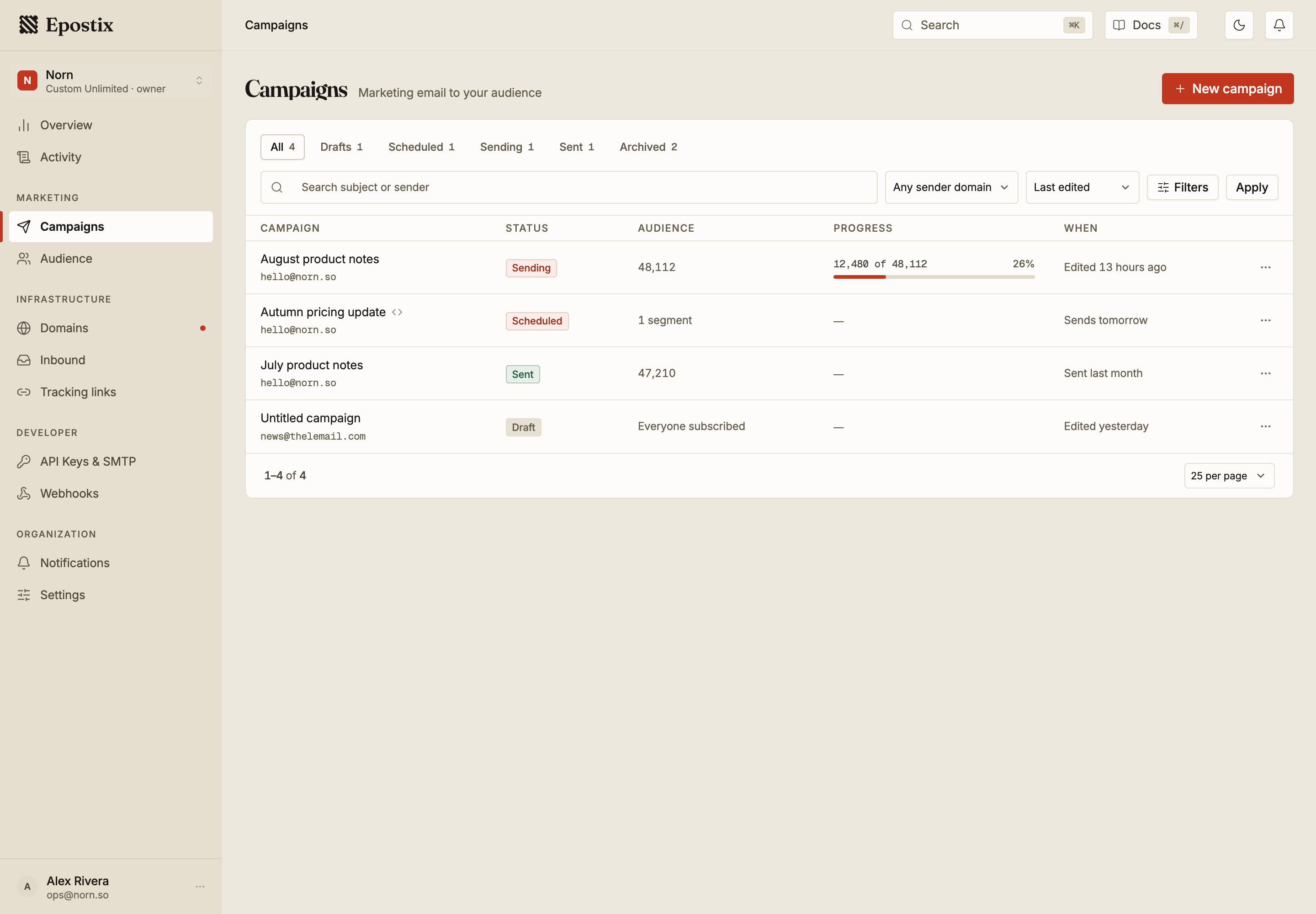
Statuses
| Status | Meaning |
|---|---|
| Draft | Being written. Not scheduled, not sent |
| Scheduled | Waiting for its send time |
| Sending | Being handed to the relay now |
| Paused | Sending was interrupted and can be resumed |
| Sent | Finished |
| Cancelled | Stopped part-way and cannot be restarted |
| Archived | Hidden from the default list, kept for its report |
A campaign can only be edited while it is a Draft or Scheduled. Once sending starts the content is fixed, because some recipients already have it.
The tabs above the list group these: Sending covers both sending and paused, and Sent covers everything that finished. Archived campaigns are hidden everywhere except the Archived tab. A cancelled campaign has no tab of its own, so look for it under All.
Writing the campaign
The editor has two modes. Visual is a normal composer. HTML takes markup you paste in, which is what you want if your email is built elsewhere.
Type {{ anywhere to insert a variable. Variables are filled per recipient when the campaign
sends, so a preview always shows sample values rather than real ones.
The Size meter in the header tracks how large the message is. It matters more than it looks, and the reason is in the checks below.
Problems
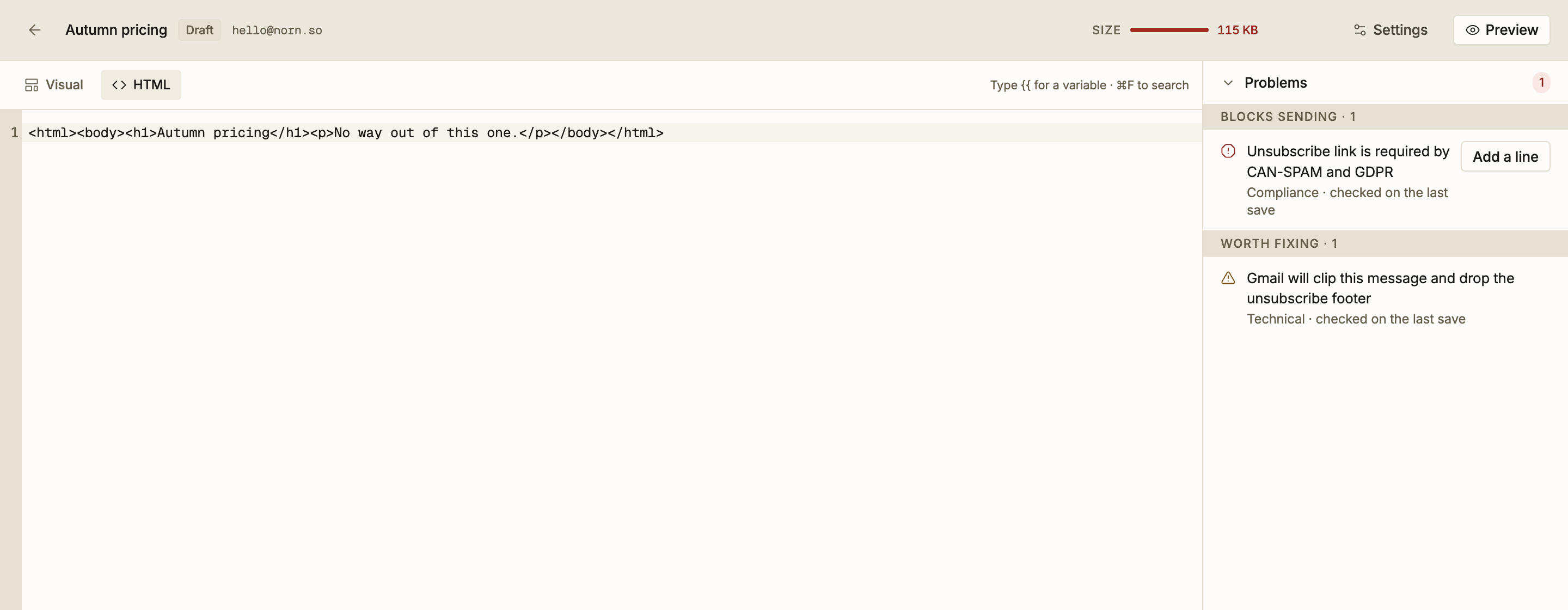
Every save runs a set of checks and sorts the results into two groups.
Blocks sending must be fixed. The campaign cannot go out while one is open. The clearest example is a missing unsubscribe link, which is required by CAN-SPAM and GDPR.
Worth fixing is advice. You can send with these open, and sometimes that is the right call, but each one costs you something measurable.
The checks cover five areas: content, compliance, technical, deliverability and audience. They include the subject line, the from address, whether an unsubscribe link is present, the spam score, the message size, the number of recipients, and whether every variable you used actually exists.
Message size
Gmail clips a message once it passes roughly 102 KB, and the check warns from about 92 KB.
Clipping is not cosmetic. A clipped message loses everything after the cut, which is usually the unsubscribe footer and the open-tracking pixel. You end up with a message that is harder to unsubscribe from and whose opens you cannot measure, in the inbox provider with the largest share of most lists.
The size Epostix reports is the size after link rewriting, so it counts bytes that click tracking adds and that you cannot see in the editor. A message that looks comfortably small can cross the line once its links are rewritten.
Unknown variables
If you use a variable that does not exist, the check names it and suggests the closest real one. This catches a misspelling before it renders as an empty space in thousands of mailboxes.
Scheduling and sending
A campaign can go out immediately or at a chosen time. Scheduled campaigns stay editable until they start, so a scheduled send is a safe default when you want a colleague to read it first.
While a campaign sends, the list shows how far along it is, for example 12,480 of 48,112.
Sending moves through three phases: handing messages to the relay, waiting for recipient
servers to confirm, and complete. The middle phase is normal and means the work is done on
our side.
Stopping a send
Pause interrupts a send and keeps it resumable.
Stop is different, and it is worth reading before you use it.
Stopping a send cannot be undone. Messages already handed to the relay are on their way and cannot be recalled. Everyone still in the queue will not receive the campaign, and the campaign cannot be restarted.
The confirmation asks you to type stop, because there is no way back from it.
If the problem is the content rather than the audience, and the campaign uses tracking links, re-pointing a link fixes the destination for everyone who has already received the message. That is often a better repair than stopping a send.
Reading the report
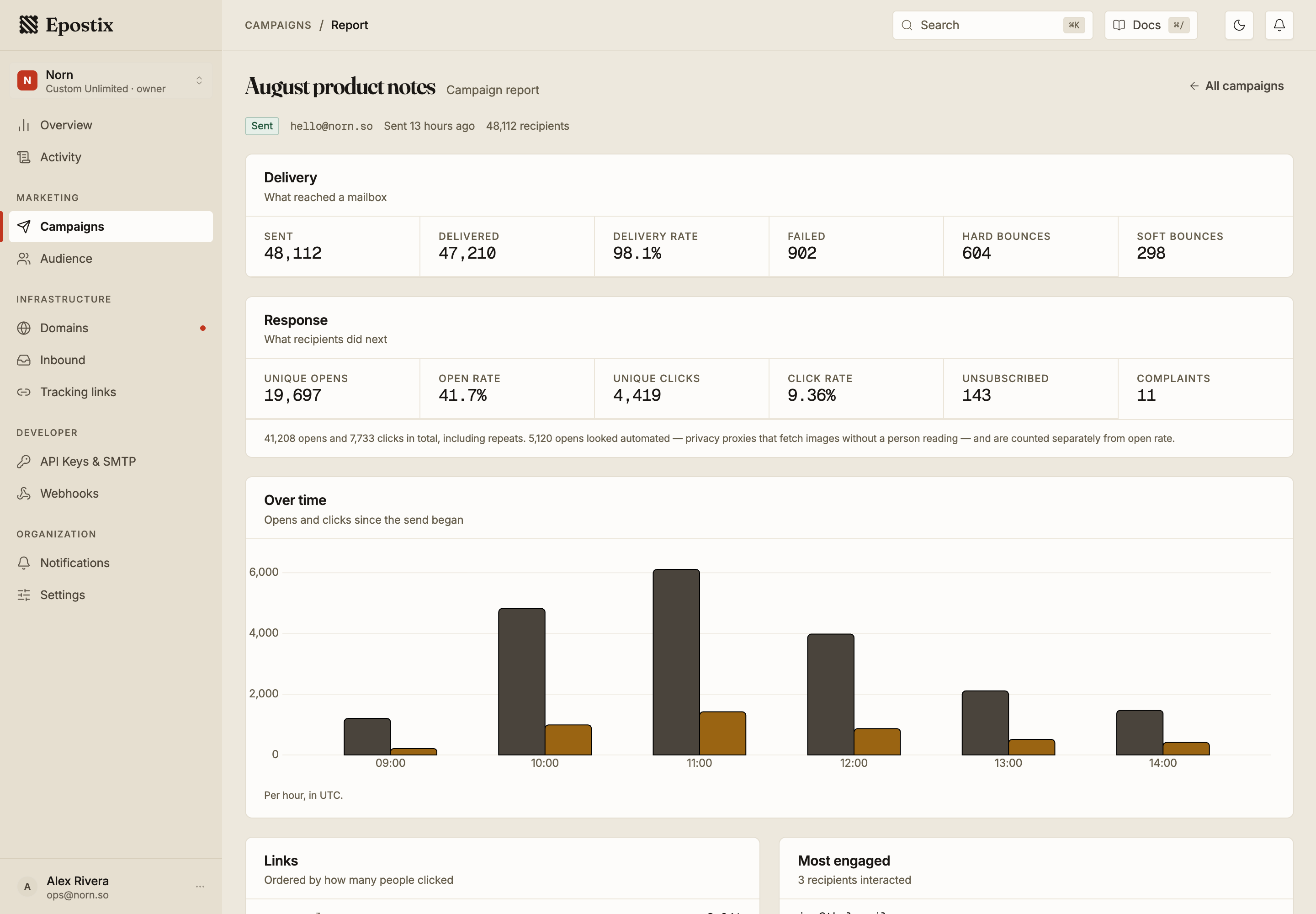
The report splits into what reached a mailbox and what recipients did next.
Delivery covers sent, delivered, delivery rate, failed, and bounces split into hard and soft. The hard and soft split is the one to look at, because hard bounces are what damage your reputation.
Response covers unique opens, open rate, unique clicks, click rate, unsubscribes and complaints.
Unique means people, not events. A recipient who opens a message four times counts once in unique opens. The line under the tiles gives the totals including repeats, so you can see both.
Automated opens are separated out. Opens that came from an Apple privacy proxy, a security scanner or an unidentified bot are counted apart from the unique-open figure, so your open rate is not inflated by software fetching images. Clicks exclude scanners and bots in the same way. See how far to trust an open for what these signals are worth.
The report also charts opens and clicks over time, which links were clicked and by how many people, and which recipients engaged most. The chart buckets by hour for a recent send and by day once the campaign covers a longer period, so the axis reads as clock times on the day of the send and as dates afterwards. Bars are used rather than a line, because each bucket is a count and a line between two daily points would suggest a trend the data does not show.
Complaints matter more than their small number suggests. A complaint means someone marked the message as spam, and inbox providers weight that heavily. If a campaign produces noticeably more complaints than usual, treat it as a signal about the list or the subject line rather than as noise.
Archiving and reusing
Archive hides a finished campaign from the default list without deleting it. Its report stays available.
Duplicate copies a campaign into a new draft, which is the normal way to run a recurring send without rebuilding it.
Deleting a draft removes it and its content. Nothing was sent, so there is nothing to report on afterwards.