Webhook setup
A webhook endpoint is a URL of yours that Epostix posts to as things happen to your mail. Nothing is polled and nothing is batched: each event is its own request.
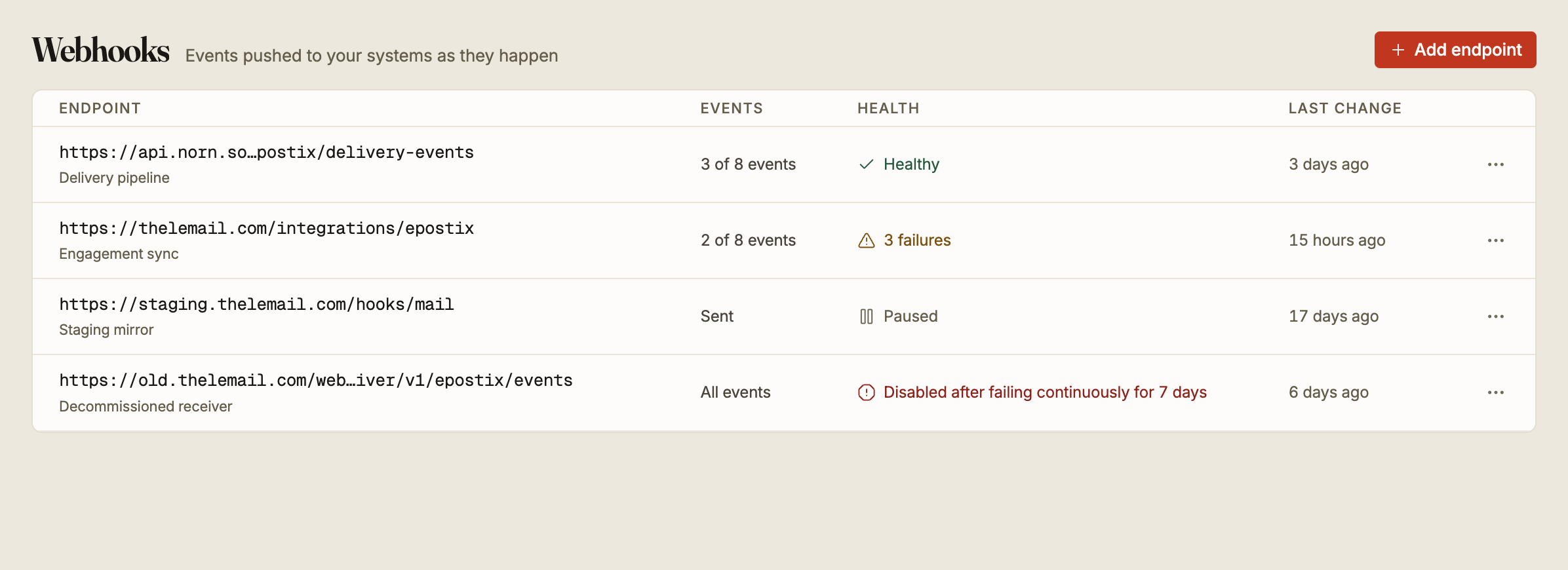
Adding an endpoint
Add endpoint asks for four things.
The URL has to start with http:// or https://. Private and internal addresses are
refused, so localhost, 127.0.0.1, anything in 10.0.0.0/8, 172.16.0.0/12 or
192.168.0.0/16, and hostnames ending in .internal will not be accepted. Epostix has to
reach your endpoint from the public internet, and a tunnel is the usual way to test against
a machine on your desk.
The events are which of the event types this endpoint should receive, grouped by family: message delivery, inbound mail, domains, campaigns and audience. At least one is required. Subscribe to what you will act on rather than everything, because every event you subscribe to is a request your server has to answer.
The domains narrow the endpoint to specific domains. Leave it on Every domain — the default — and the endpoint covers every domain in the workspace, including ones you add later. Narrowing is only offered while every event you picked carries a domain; choosing a campaign, contact or suppression event returns the endpoint to every domain, because those events are workspace-wide. See narrowing an endpoint to a domain.
A description is optional and up to 200 characters. It is what the list shows under the URL, and it is worth filling in the moment you have more than one endpoint.
A workspace can have up to 20 endpoints.
The signing secret
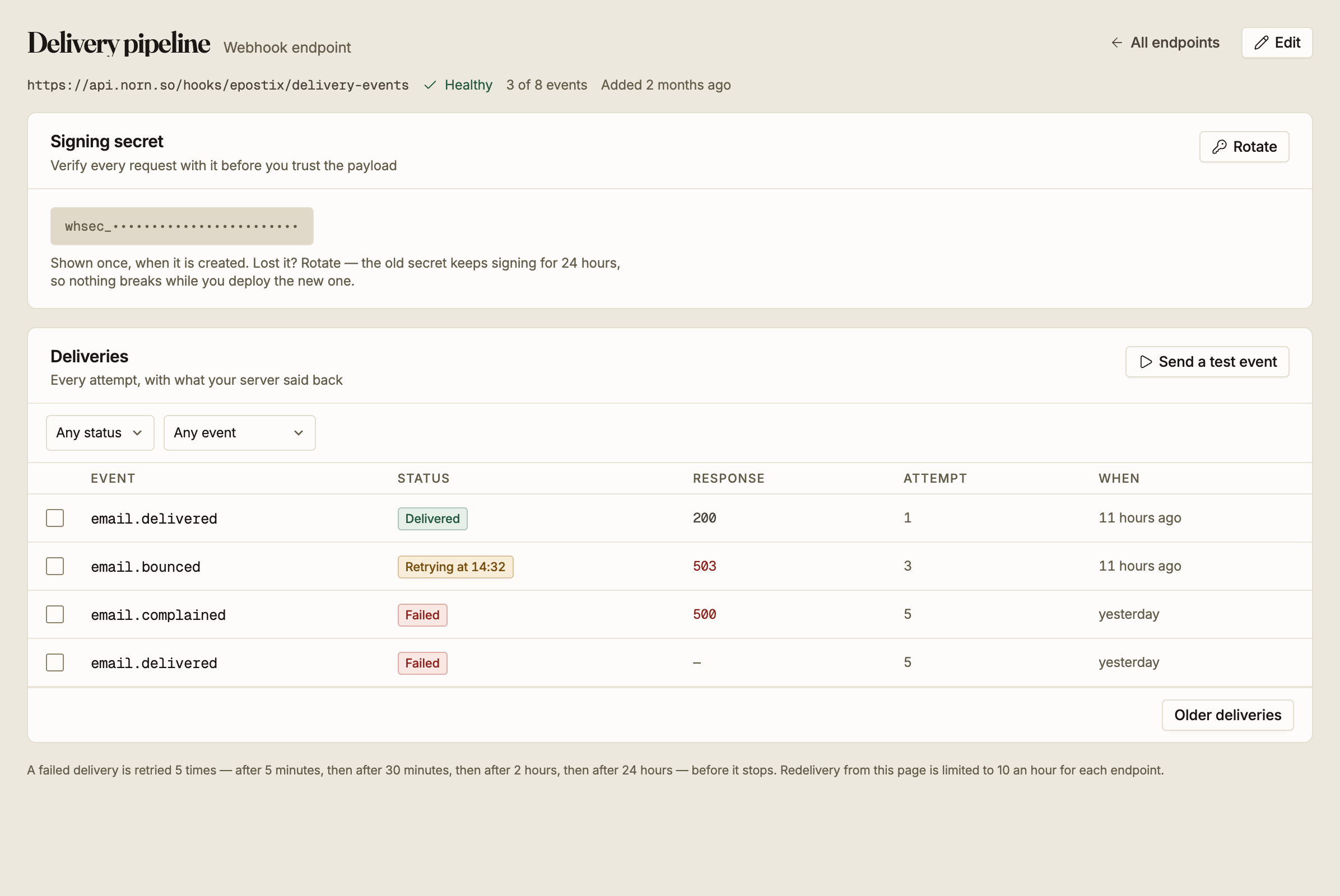
Each endpoint has a secret, shown in full exactly once when the endpoint is created. After
that the screen shows only the whsec_ prefix. You can supply your own secret instead of
letting Epostix generate one.
Verifying a request
Every delivery carries these headers:
| Header | Value |
|---|---|
Webhook-Id | A unique id for this delivery attempt |
Webhook-Timestamp | When it was signed, in Unix seconds |
Webhook-Signature | t=<timestamp>,v1=<signature> |
Content-Type | application/json |
User-Agent | Epostix-Webhooks/1.0 |
The signature is an HMAC-SHA256, hex encoded, over the timestamp and the raw body joined by a dot:
signed_content = "{Webhook-Timestamp}.{raw request body}"
signature      = hex(hmac_sha256(signed_content, secret))
Compare that against the v1= value with a constant-time comparison.
Sign the raw body exactly as received. Parsing the JSON and re-serialising it changes whitespace and key order, and the signature will never match. Read the raw bytes first, verify, then parse.
Treat an unverified request as hostile. Your endpoint is a public URL, so anyone can post to it, and the signature is the only thing that says a request came from Epostix.
Rotating
Rotate issues a new secret and shows it once. The previous secret keeps validating for 24 hours, so both are accepted while you deploy the new one. Accept either during that window and drop the old one afterwards.
Rotate if the secret leaks, and rotate if you lost it, since there is no way to display it again.
Retries
A delivery counts as successful when your server answers with a 2xx status. Anything else, including a timeout or a connection failure, is a failure.
A failed delivery is retried up to five attempts in total:
| Attempt | When |
|---|---|
| 1 | Immediately |
| 2 | After 5 minutes |
| 3 | After 30 minutes |
| 4 | After 2 hours |
| 5 | After 24 hours |
After the fifth, that event stops being retried and is marked Failed.
The last gap is a day long, so an outage on your side that is fixed within a few hours may
still see deliveries arrive long afterwards. Your handler needs to be idempotent: the
same event can arrive more than once, and Webhook-Id plus the event id is how you
recognise a repeat.
Health
The list shows one of four states per endpoint.
| State | Meaning |
|---|---|
| Healthy | Nothing is failing |
| n failures | Deliveries are failing, and this many have failed since the first one |
| Paused | You turned it off. Nothing is sent |
| Disabled | Epostix turned it off after 7 days of continuous failure |
One success clears the count. A failing endpoint that answers correctly once goes back to Healthy, and the clock that leads to being disabled resets with it.
An endpoint that has been failing continuously for seven days is disabled automatically and says so on the screen. Turning it back on clears the failure history and starts it fresh, so fix the receiving end first.
Testing and replaying
Send a test event posts a webhook.test event to the endpoint immediately. It is the
fastest way to confirm the URL, the signature check and your handler all work. This event
type cannot be subscribed to; it only ever arrives because you asked for it.
The delivery log lists every attempt with the status your server returned, which attempt number it was, and when. Filter it by status or by event type. Open a delivery to see exactly what was sent and exactly what came back, which is usually enough to tell a signature bug from an application error.
Select deliveries to send them again. Redelivery is limited to 10 an hour per endpoint, which is enough to recover from a bad deploy and not enough to replay a week of traffic.